AI agent permissions
You choose the context.
One person allowed, another excluded. The chats relevant to a project, the calendars you want your assistant to see. Decide which information to make available for your agents’ work.
See and manage access in one place.
The Assistant permissions screen brings people, chats and calendars together. Search by name, filter by tag, channel or recent activity, and inspect individual choices. Changes take effect when you save.
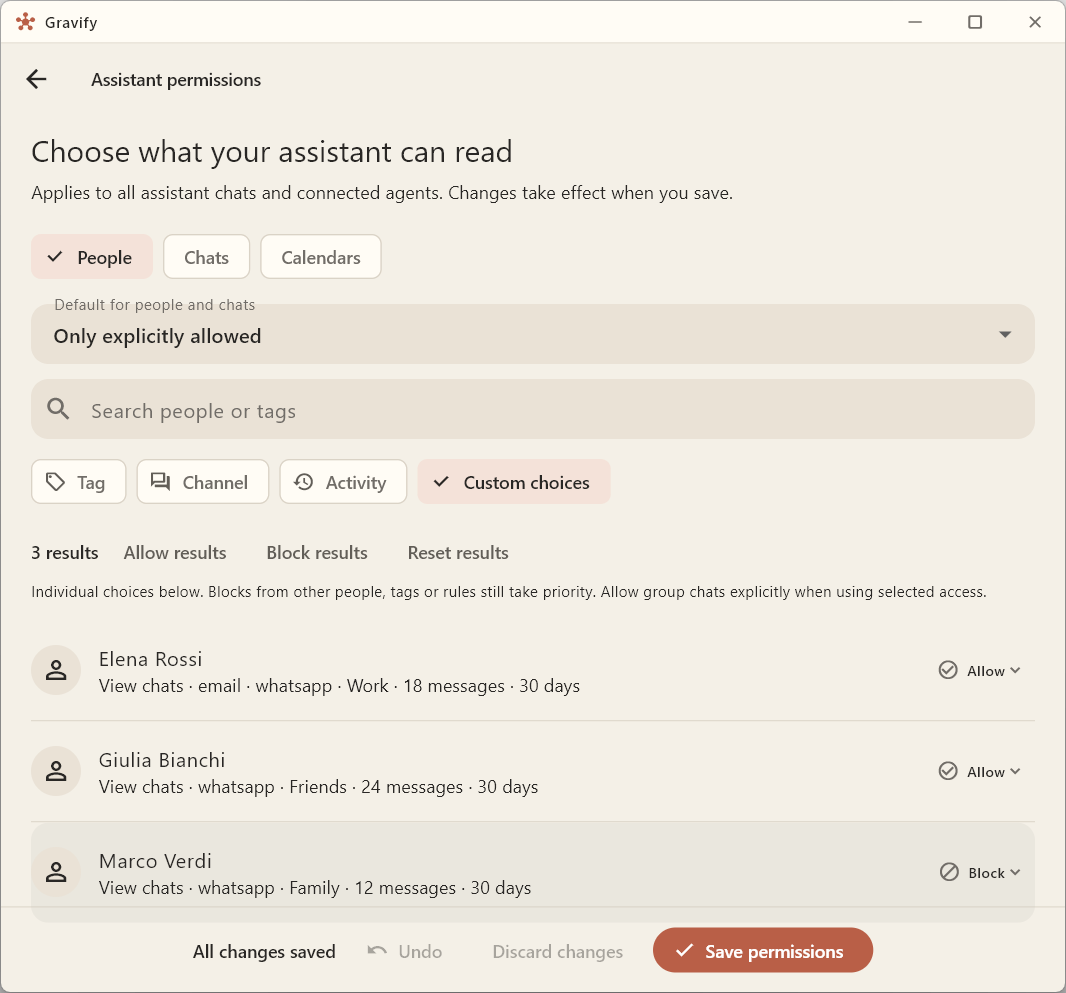
Start with what you want to make accessible.
- People and chats. Allow access unless blocked, or allow only explicit selections. With selective access, group chats also need to be explicitly allowed.
- Exclusions. Blocks take priority over inclusions, including blocks from other people, tags or rules.
- Calendars. Block the calendars you want to exclude. Calendars are allowed unless blocked, including newly connected ones; this is separate from selective access to people and chats.
Apply a choice to filtered results, undo an edit or discard unsaved changes. The rules apply to all Assistant chats and connected agents, without repeating them for each request.
Data access and action approval.
Reading context and sending a message are separate steps. Drafts remain yours to review, edit or discard. Calendar proposals show the change before you apply it. Messages to other people always require your explicit approval.
See drafts and proposals in the app →Your Hub, your choice of model.
Your archive and connections stay on hardware you control. When you use an AI provider, the authorized context needed for your request is shared with that provider. Changing permissions governs future access; it does not withdraw content already shared with a model.